Reviewed by the Freelance OS editorial team · Editorial policy
ProposalsAI Proposal Generation: How Freelancers Can Use AI to Write Better Proposals Without Sounding Generic
AI proposal generation works best when the draft combines the job brief with your profile, relevant experience, and portfolio proof—not when it merely paraphrases the client’s post.
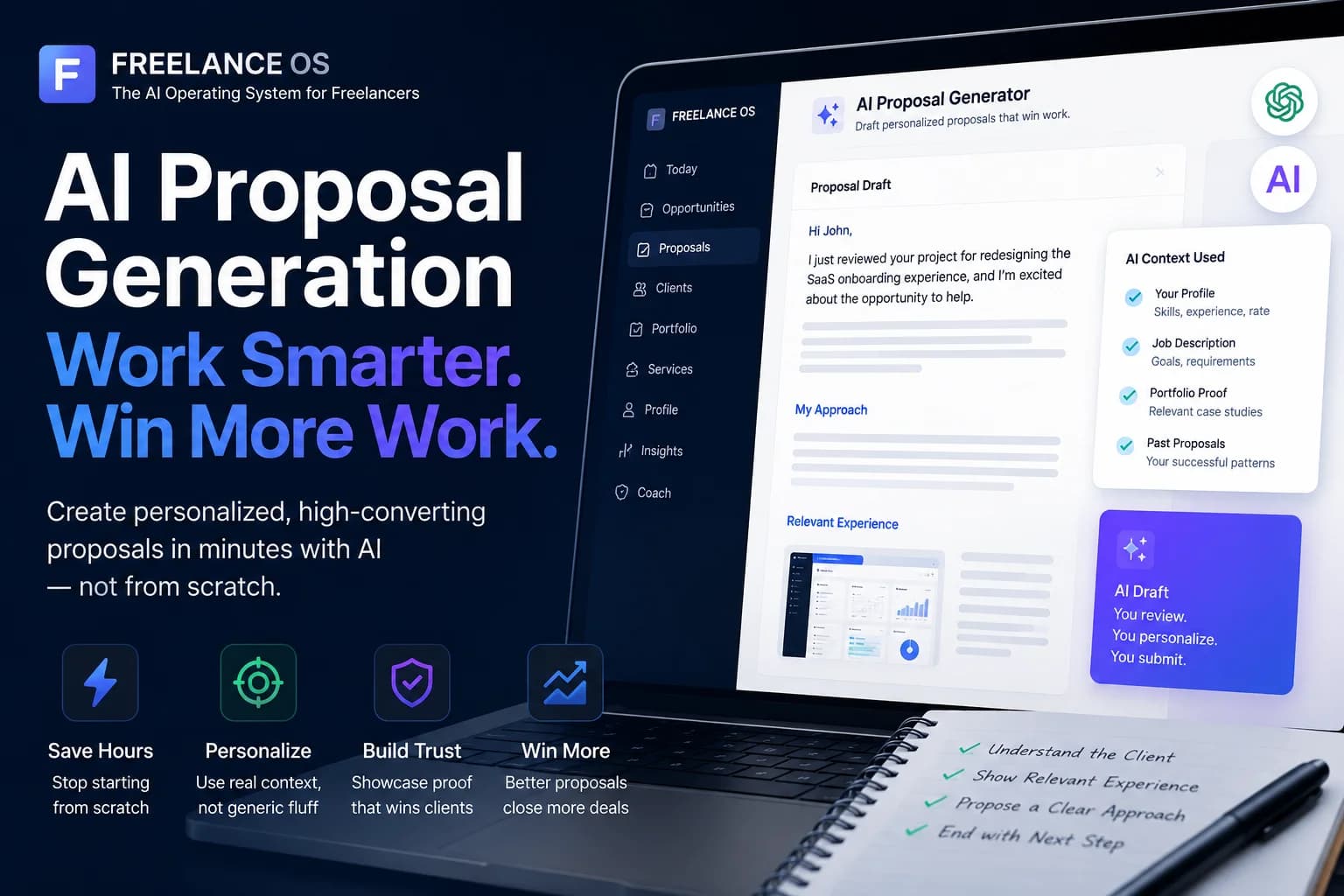
AI proposal generation uses artificial intelligence to turn a job brief and freelancer context into a proposal draft. It can reduce repetitive writing, but the quality depends on the information supplied: the client’s problem, your skills, relevant experience, portfolio proof, and a credible plan. Freelance OS, an AI operating system for freelancers, connects those inputs so you can stop starting from scratch every time you apply for work.
#What is AI proposal generation?
AI proposal generation is the process of using an AI model to research a freelance opportunity, identify its requirements, organize a response, and draft proposal copy. A useful AI proposal generator does more than rewrite the job post. It connects the opportunity to evidence from the freelancer’s profile and portfolio, then produces a draft for the freelancer to review, edit, and submit manually.
Freelancers commonly use AI proposal writing for:
- Upwork applications
- Fiverr custom offers
- Direct client pitches
- Agency subcontractor applications
- Responses to website and LinkedIn inquiries
- Follow-up messages after discovery calls
The goal is not to remove the freelancer from the process. It is to reduce blank-page work while preserving judgment, accuracy, and a human voice.
A good operating principle is simple:
The OS drafts. You review. You submit.
AI should assist with analysis and writing. It should not invent experience, promise outcomes, or submit applications without your review.
#Why freelancers use AI for proposals
Freelancers use AI because proposal writing is repetitive but rarely identical. Most applications need the same broad components—an opening, proof, an approach, questions, and a next step—but each client has different priorities. AI can assemble those components faster, leaving the freelancer to focus on job selection and final editing.
The practical benefits include:
- Faster first drafts: You do not have to reconstruct your background for every application.
- Better organization: AI can turn rough notes into a clear sequence.
- Job-post analysis: It can identify deliverables, constraints, risks, and missing information.
- Relevant proof selection: A connected system can surface portfolio items related to the opportunity.
- Tone control: You can request a concise, technical, consultative, or conversational draft.
- Reusable knowledge: Strong openings, explanations, and discovery questions can be saved for related jobs.
This is especially useful for freelancers who apply selectively but consistently. Writing five thoughtful proposals from zero is tiring. Producing five reviewed drafts from structured context is more manageable.
Speed is not the only objective, however. A fast proposal that sounds unrelated to you is still weak.
#Why generic AI-generated proposals underperform
Generic proposals usually fail because they describe enthusiasm instead of demonstrating fit. They repeat the client’s request, list broad skills, and close with an empty promise to “deliver high-quality work.” The language may be grammatically clean, yet give the client no reason to trust that particular freelancer.
Common signs of a generic AI proposal include:
- “I am excited to apply for your project.”
- “I have read your job description carefully.”
- A long list of skills copied from the brief
- Claims such as “I am the perfect candidate”
- Repeated use of the client’s own wording
- No reference to comparable work
- No explanation of how the project would be approached
- Several paragraphs about the freelancer before addressing the problem
- An invitation to “discuss further” with no useful question
Clients can often recognize the pattern, even if they cannot prove AI was involved. The problem is not AI itself. The problem is a draft produced without enough real context.
Warning
#Why pasting a job post into ChatGPT is not enough
A job post tells an AI model what the client wants, but not why you are qualified to provide it. Without your profile, experience, work samples, availability, rates, and constraints, the model can only paraphrase the post or fill gaps with assumptions.
Consider this request:
“We need a developer to improve the checkout performance of our Shopify store.”
From that sentence, an AI can identify Shopify and performance as key topics. It cannot know whether you have optimized Shopify themes, worked with checkout extensibility, diagnosed third-party scripts, or improved Core Web Vitals. It also cannot know which portfolio item supports your claim.
This distinction matters:
- Job-only prompt: “Write a proposal for this Shopify performance job.”
- Contextual prompt: “Write a concise proposal using my experience auditing Shopify theme performance, my case study about reducing third-party script load, and my preference for starting with a measured baseline. Do not claim a performance improvement before an audit.”
The second prompt has boundaries, proof, and an approach. That gives the AI proposal writer something credible to say.
#What context an AI proposal writer needs
A strong AI proposal writer needs a compact context package covering the job, the freelancer, relevant evidence, and submission constraints. More context is not automatically better; the useful material is the information that helps the model decide what to emphasize and what to omit.
#1. Job context
Capture the information stated in the brief:
- Required deliverables
- Skills or tools
- Timeline and budget, if provided
- Current problem or business objective
- Technical or operational constraints
- Requested application questions
- Signals about the client’s priorities
Separate facts from assumptions. If the client asks for a landing page but does not mention the conversion goal, the draft should ask about it rather than invent one.
#2. Profile context
The model should know your:
- Primary service and niche
- Relevant skills
- Level of experience
- Preferred project types
- Availability
- Typical working process
- Communication style
- Geographic or time-zone constraints, where relevant
Keeping this information in a structured freelancer profile is more reliable than rewriting it in every prompt.
#3. Relevant experience
Supply two or three closely related examples, not your entire work history. For each example, note:
- The client’s starting problem
- What you were responsible for
- The work you completed
- The tools or methods used
- The outcome, if documented
- What can be shared publicly
Use measurable results only when you can support them. “Reorganized a 40-page help center” is a verifiable scope statement. “Dramatically improved customer satisfaction” needs evidence.
#4. Portfolio proof
Portfolio proof is a work sample, case study, screenshot, deliverable, or documented outcome that supports a proposal claim. It converts “I can do this” into “Here is relevant work and how I approached it.”
A designer might attach a checkout redesign. A developer might reference a performance audit. A writer might share an article in the same subject area. A virtual assistant could show a redacted process document or reporting dashboard.
If your raw project notes are not presentation-ready, Portfolio Studio can help turn them into structured case studies and shareable showcases. Review every case study for confidentiality and factual accuracy before using it.
#5. Draft constraints
Tell the AI what the proposal should avoid and how it should read:
- Maximum length
- Desired tone
- Required questions
- Words or claims to avoid
- Whether pricing should be mentioned
- Which work sample to reference
- Which facts remain uncertain
- The action you want the client to take next
Constraints reduce filler. “Write 180–220 words, open with the checkout issue, cite one relevant project, ask two diagnostic questions, and avoid unsupported estimates” is more useful than “make it persuasive.”
#Anatomy of a strong freelance proposal
A strong freelance proposal helps the client answer three questions quickly: Does this person understand the problem? Is there credible evidence they can handle it? What happens next? Most proposals can address those questions in five compact parts rather than a long cover letter.
#1. A problem-focused opening
Start with the client’s situation, not your excitement about the listing.
A useful opening may identify:
- The likely bottleneck
- A relevant constraint
- A key decision
- A specific detail from the brief
Do not pretend to have diagnosed a system you have not seen. Use calibrated wording such as “I would first check,” “a common source is,” or “the brief suggests.”
#2. Relevant proof
Choose one example that resembles the current project. Explain the connection rather than dropping an unexplained portfolio link.
For example:
I recently audited a Shopify theme where app scripts were loading across templates that did not use them. The relevant part here is the diagnostic process: baseline measurement, script mapping, controlled changes, and regression checks.
That is stronger than “I have five years of Shopify experience” because it shows applied understanding.
#3. A brief approach
Outline the first few steps without giving away an entire unpaid solution. For a technical project, that could be audit, prioritization, implementation, and testing. For a writing project, it might be audience research, outline approval, draft, and revisions.
The approach should reduce uncertainty, not inflate the proposal.
#4. Focused discovery questions
Ask questions that affect scope or method. Avoid questions already answered in the post.
Examples include:
- Which pages or workflows are currently causing the most concern?
- Do you have analytics, recordings, or baseline performance reports?
- Who approves the final deliverables?
- Are there tools or systems that cannot be changed?
- Is the deadline tied to a launch or campaign?
Two good questions usually reveal more expertise than ten generic ones.
#5. A low-friction next step
Close with a specific next action:
- Share the current report
- Send the design file
- Confirm the required integrations
- Schedule a short scoping call
- Review a relevant work sample
The close should invite progress without pressure or an exaggerated promise.
#How AI can assist without taking over
AI is most useful as a research and drafting assistant. It can extract requirements, compare the job with your profile, identify relevant proof, propose discovery questions, and produce multiple structures. The freelancer remains responsible for deciding whether the opportunity is suitable and whether the final proposal is truthful.
Useful AI tasks include:
- Summarizing the brief: Convert a long post into deliverables, constraints, and questions.
- Finding ambiguity: Flag missing access details, unclear scope, or conflicting requirements.
- Matching experience: Compare the opportunity with profile skills and portfolio items.
- Choosing an angle: Decide whether the proposal should lead with technical fit, industry knowledge, process, or proof.
- Creating variants: Draft concise, consultative, and technical versions.
- Removing repetition: Cut redundant sentences and repeated job-post language.
- Testing relevance: Check whether each paragraph helps the client evaluate fit.
- Suggesting questions: Produce questions tied to scope, risk, and delivery.
AI cannot verify a claim merely because it generated the sentence. It also cannot decide whether confidential client work is safe to share. Those decisions stay with the freelancer.
#A practical AI proposal workflow
The most reliable workflow moves from job selection to context gathering, proof selection, drafting, and manual review. This order prevents the draft from driving the strategy. Decide why the job fits before asking AI to write the application.
#Step 1: Qualify the opportunity
Check whether the project matches your services, experience, schedule, and commercial requirements. Look for unclear scope, unrealistic deadlines, or work that falls outside your actual capabilities.
You can use a job analyzer to review fit, required skills, and risk signals before spending time on a proposal.
#Step 2: Extract the client’s real problem
Write a one-sentence problem statement.
For example:
The client needs to identify and fix the causes of slow Shopify product and collection pages without disrupting revenue-critical apps.
That is more actionable than “The client needs a Shopify developer.”
#Step 3: Load profile context
Select only the profile details that support this application:
- Relevant specialty
- Applicable tools
- Similar project experience
- Availability
- Communication or delivery preference
Do not force every skill into the proposal.
#Step 4: Select portfolio proof
Choose the closest example based on problem, project type, industry, or method. Exact industry similarity is helpful but not mandatory. A strong process match can be more convincing than a weak industry match.
For confidential work, describe the challenge and your role without naming the client or revealing protected information.
#Step 5: Ask AI for a structured draft
Request a defined output rather than “a winning proposal.” A practical instruction might specify:
- 200 words maximum
- Direct opening
- One relevant example
- Three-step approach
- Two discovery questions
- No unsupported metrics
- No generic praise
- No claims that are absent from the profile
Freelance OS provides a signed-in proposal workspace with proposal variants, trust validation, and discovery-question assistance. The draft can draw on connected freelancer context rather than treating every application as an isolated writing task.
#Step 6: Edit it into your voice
Replace phrases you would not use in a client conversation. Shorten overexplained sections. Add a useful technical or commercial observation that comes from your own experience.
A practical editing test is to read the proposal aloud. If it sounds like a formal cover letter but you normally communicate plainly, revise it.
#Step 7: Validate every claim
Check names, tools, dates, links, metrics, qualifications, and work samples. Confirm that the draft does not imply you completed work that belonged to a team unless it clearly states your role.
#Step 8: Submit manually
Copy the reviewed proposal into the relevant marketplace or client channel. Confirm formatting, answer any platform-specific questions, attach the intended sample, and submit it yourself.
Job context → profile context → portfolio proof → AI draft → freelancer review and edits → manual submission
#Weak generic proposal vs contextual proposal
The difference between weak and strong AI proposals is not decorative language. It is the amount of relevant information the draft gives the client. The contextual version below avoids claiming a result before reviewing the store, connects prior work to the problem, and asks questions that affect the scope.
#Weak generic proposal
Hi,
I am excited to apply for your Shopify speed optimization project. I have extensive experience with Shopify, web development, and website optimization. I have read your requirements and am confident I can improve your website speed and deliver high-quality results on time.
I am hardworking, detail-oriented, and committed to client satisfaction. Please contact me so we can discuss the project further.
Best regards.
This proposal could be sent by almost any developer. It contains no proof, no diagnostic thinking, and no useful next step.
#Contextual proposal
Your brief suggests the first priority is finding what is slowing the product and collection templates before changing the theme or removing revenue-critical apps.
I have handled a similar Shopify audit where the main task was mapping third-party scripts, theme assets, and template-specific loading behavior. I would use the same staged process here: capture a baseline, identify the largest avoidable costs, prioritize changes by impact and risk, then test key purchase flows after implementation.
I can also share a redacted example of the audit format I use, including the issue list and recommended action order.
Two questions before estimating the work:
1. Are the slowdowns more noticeable on mobile or across all devices?
2. Have any major theme or app changes been made recently?
If you share the store URL and any existing performance report, I can review the available context and suggest the most sensible starting point.
The second version remains concise, but each paragraph has a job: frame the problem, provide proof, explain the approach, ask informed questions, and define the next step.
#AI writing tool vs connected freelance workspace
A general AI writing tool can produce competent prose, but it typically starts without persistent knowledge of your freelance business. A connected workspace can use structured profile details, portfolio evidence, opportunity context, proposal history, and client information to support a more consistent workflow.
| Capability | General AI writing tool | Connected freelance workspace |
|---|---|---|
| Understands the job post | If pasted into the chat | Stored with the opportunity |
| Knows your profile | Only if supplied each time | Can use saved profile context |
| Selects portfolio proof | Requires manual prompting | Can connect relevant saved work |
| Maintains proposal history | Usually scattered across chats | Organized with proposal records |
| Supports job qualification | Requires a separate process | Can connect analysis and drafting |
| Produces final submission | Draft only | Draft only; freelancer submits |
| Business context | Limited to the current conversation | Can connect proposals with clients, services, and insights |
The practical advantage is continuity. You spend less time rebuilding the same context and more time deciding what matters for a particular client.
Freelance OS is not simply a freelance proposal generator. It connects Profile, Proposals, Portfolio, Opportunities, Clients, Services, Coach, Insights, and Today as parts of a broader freelancer operating system. Recommendation Engine and AI Business Reviews are coming soon; they are not currently live.
#What to review before submitting
Every AI-generated proposal needs a human review. The final pass should check truth, relevance, tone, client instructions, and attachments. Even a strong model can confuse details, overstate certainty, or carry language from one draft into another.
Use this checklist:
- [ ] The opening addresses the actual client problem.
- [ ] The client’s name and company are correct, if included.
- [ ] Every stated skill or project is yours.
- [ ] Metrics and outcomes can be supported.
- [ ] The portfolio item is relevant and safe to share.
- [ ] The proposal does not repeat large parts of the job post.
- [ ] The approach fits the requested deliverables.
- [ ] Questions are not already answered in the brief.
- [ ] The tone sounds like you.
- [ ] Pricing and availability are accurate.
- [ ] No paragraph contains an exaggerated promise.
- [ ] All marketplace-specific questions are answered.
- [ ] You are comfortable defending every sentence in an interview.
A useful final test is to remove your name and ask: Could this proposal have been sent by 100 other freelancers? If so, add a specific observation, proof point, or process detail that genuinely belongs to you.
#Key takeaways
- AI proposal generation is strongest when it combines job context, profile details, experience, and portfolio proof.
- Pasting a job post into a general chatbot usually produces a paraphrase, not a differentiated pitch.
- AI can research, structure, suggest, and draft. The freelancer must verify, edit, and submit.
- One closely related work example is usually more persuasive than a long list of skills.
- Strong proposals focus on the client’s problem, credible proof, a sensible approach, and useful questions.
- The objective is not to automate judgment. It is to stop starting from scratch every time you apply for work.
#Frequently asked questions
#Can I use AI proposals for Upwork?
Yes. AI proposals for Upwork can help you analyze a listing, organize relevant experience, and prepare a draft. You should review the final text, answer every application question accurately, and submit the proposal manually. Avoid sending the same template to unrelated jobs.
#How long should an AI-generated freelance proposal be?
There is no universal length, but many proposals can make their case in roughly 150–300 words. Complex consulting or technical work may require more detail. Keep a sentence only if it helps the client understand the problem, verify your fit, or take the next step.
#How do I stop an AI proposal from sounding robotic?
Provide real examples, specify your natural tone, ban phrases you would not use, and edit the output aloud. Replace broad claims with concrete observations. Sentence variety also helps, but specificity matters more than making the prose appear casually human.
#Should every proposal include a portfolio link?
Include a portfolio item when it directly supports the application and can be shared safely. A weak or unrelated sample may distract from the proposal. If work is confidential, use a redacted case study or explain the process and your role without exposing client information.
#Where can I try AI proposal generation?
You can test the free AI proposal generator with a job post, then review and personalize the resulting draft. For a connected workflow using profile context, proposals, and portfolio proof, create a Freelance OS account. In both cases, you remain responsible for reviewing and submitting the proposal.